By
By 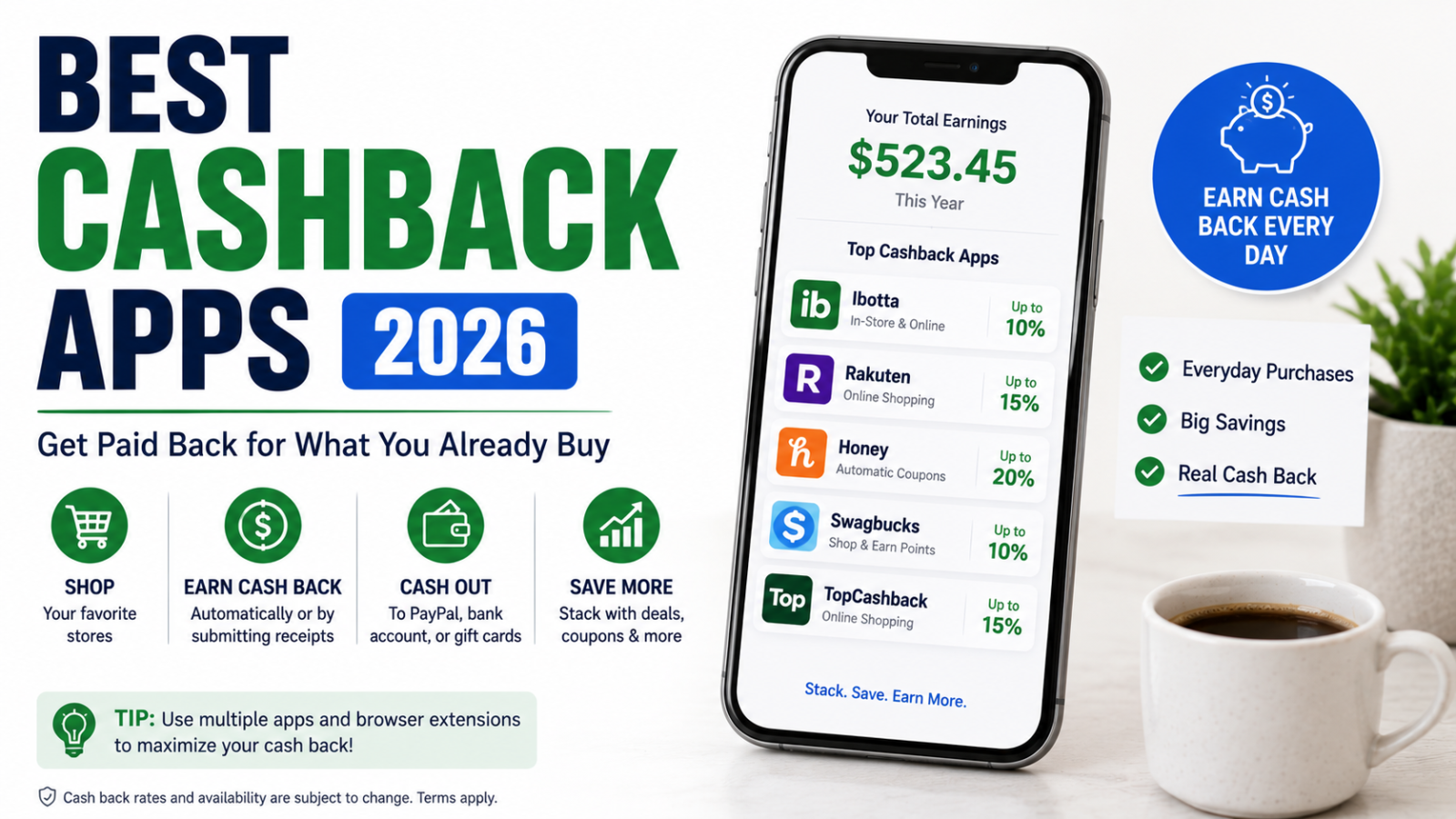
What if you could get money back on purchases you were going to make anyway? No couponing, no extra effort, no changing your shopping habits — just free money deposited into your account.
That’s the promise of cashback apps and browser extensions, and in 2026, the options are better than ever. These tools sit quietly in the background, automatically applying discounts and earning you cash back on everything from groceries to online shopping to gas.
The catch? There are dozens of options, and not all are created equal. Some offer huge returns on specific categories. Others work best when stacked together. And a few are borderline useless.
This guide covers the best cashback apps and browser extensions available right now, explains exactly how each one works, and shows you how to stack them for maximum savings. If you’re already using a cash back credit card, these tools can multiply your returns even further.
How Cashback Apps and Extensions Actually Work
Before diving into specific tools, it helps to understand the business model. Cashback apps aren’t giving you money out of the goodness of their hearts. Here’s how they make money (and how you benefit):
- Retailers pay the app a commission for sending customers their way (this is called affiliate marketing).
- The app shares a portion of that commission with you as cash back.
- You get paid for shopping at stores you were already going to visit.
It’s a win-win-win: the retailer gets a customer, the app gets a commission, and you get cash back. The key insight is that you’re not paying more for anything — the cashback comes from the retailer’s marketing budget, not from a markup on prices.
The Best Cashback Apps in 2026
Rakuten (Formerly Ebates)
Best for: Online shopping at major retailers
Rakuten is the gold standard of cashback platforms and has paid out over $4 billion to its members. It works with more than 3,500 stores including Amazon, Walmart, Target, Macy’s, Nike, and practically every major online retailer you can think of.
How it works:
- Install the browser extension or use the mobile app.
- When you visit a participating store’s website, Rakuten notifies you that cash back is available.
- Click to activate, then shop normally.
- Cash back is tracked and paid out quarterly via check or PayPal.
Typical cash back rates: 1% to 15%, with occasional promotional rates up to 20% or more during special events (like Black Friday or anniversary sales).
Standout features:
- In-store cash back at select retailers (link your credit card in the app)
- “Double Cash Back” events with elevated rates
- Cash back on travel bookings through Rakuten’s travel portal
- Referral bonuses for inviting friends
Payout: Quarterly (checks mailed or PayPal deposit). The minimum payout threshold is $5.
Best strategy: Always check Rakuten before making any online purchase. During promotional periods, rates can spike dramatically. It’s also worth checking Rakuten’s in-store offers before heading to the mall.
Ibotta
Best for: Groceries and everyday in-store purchases
While Rakuten dominates online shopping, Ibotta is the king of grocery cash back. It partners with major grocery chains, convenience stores, and big-box retailers to offer cash back on specific products.
How it works:
- Browse available offers in the app before you shop.
- Buy qualifying products at participating stores.
- Scan your receipt in the app (or link your loyalty card for automatic tracking).
- Cash back is added to your Ibotta balance.
Typical cash back: $0.25 to $5.00 per item, with occasional higher-value offers.
Standout features:
- Works at grocery stores, pharmacies, and big-box retailers
- “Any Brand” offers that give cash back on entire product categories (e.g., “any milk,” “any bread”)
- Bonuses for completing multiple offers in a month
- Pay with Ibotta feature for direct checkout savings
- Browser extension for online shopping (competing with Rakuten on some retailers)
Payout: Withdraw to PayPal, Venmo, or gift cards once you reach $20.
Best strategy: Check Ibotta before every grocery trip. Focus on “Any Brand” offers since they don’t require you to buy a specific product. Combine with manufacturer coupons and store loyalty discounts for triple savings.
Capital One Shopping (Formerly Wikibuy)
Best for: Automatic coupon codes and price comparison
Capital One Shopping is a browser extension that automatically finds and applies coupon codes at checkout. You don’t need a Capital One card to use it — it’s free for everyone.
How it works:
- Install the browser extension.
- When you’re on a checkout page, it automatically searches for and applies available coupon codes.
- It also compares prices across retailers and alerts you if the product is cheaper elsewhere.
- You earn Capital One Shopping credits on purchases, which can be redeemed for gift cards.
Typical savings: Varies widely. Sometimes it finds a 20% off code. Sometimes it finds nothing. But since it works automatically, there’s no effort on your part.
Standout features:
- Fully automatic coupon code application
- Price comparison across multiple retailers
- Price drop alerts (watchlist items and get notified when prices fall)
- Universal product search to find the lowest price online
- Works alongside cashback apps (apply a code and earn cash back)
Payout: Capital One Shopping credits redeemable for gift cards to major retailers.
Best strategy: Install it and forget about it. It works in the background and occasionally saves you money without any effort. Stack it with Rakuten: use Capital One Shopping for coupon codes and Rakuten for cash back on the same purchase.
Fetch Rewards
Best for: Cash back on any receipt, any store
Fetch takes a different approach than most cashback apps. Instead of requiring you to buy specific products or shop at specific stores, Fetch gives you points for scanning any receipt from any store.
How it works:
- Buy anything at any store.
- Open Fetch and scan (or upload) your receipt.
- Earn points on every receipt, with bonus points for buying specific partner brands.
- Redeem points for gift cards.
Typical rewards: Base points for every receipt (roughly $0.03-$0.10 per receipt), with significantly more for partner brand products (sometimes 500-1,000+ points per product).
Standout features:
- Works with literally any receipt from any store
- No need to select offers beforehand
- E-receipt scanning (connect your email to automatically capture online order receipts)
- Special offers and bonus point promotions
- Partner brands include major names like Pepsi, General Mills, Kraft, and Unilever
Payout: Points redeemable for gift cards (Amazon, Target, Starbucks, Visa, and many more). 1,000 points equals roughly $1.
Best strategy: Scan every single receipt. Grocery receipts, gas station receipts, restaurant receipts, pharmacy receipts — all of them. It takes 10 seconds and the points add up over time. Focus on partner brand offers for bigger returns.
Dosh
Best for: Passive, automatic cash back on in-store and online purchases
Dosh is one of the most truly passive cashback apps available. You link your credit or debit card once, and it automatically earns cash back when you shop at participating merchants. No scanning, no activating offers, no clicking through portals.
How it works:
- Download the app and link your credit or debit cards.
- Shop at participating merchants (in-store or online) using your linked card.
- Cash back is automatically tracked and added to your Dosh wallet.
- Transfer to your bank, PayPal, or Venmo, or donate to charity.
Typical cash back: 1% to 10% at participating merchants, which include restaurants, hotels, retailers, and online stores.
Standout features:
- Completely automatic — no receipts to scan, no offers to activate
- Works for in-store dining and shopping
- Hotel booking cash back (sometimes 5-10%)
- Referral bonuses
Payout: Transfer to bank account, PayPal, or Venmo once you reach $15.
Best strategy: Link your most-used cards and forget about it. Check the app periodically to see which local restaurants and shops offer cash back, and factor that into your dining and shopping decisions.
Honey (by PayPal)
Best for: Automatic coupon codes and price history tracking
Honey is a browser extension that automatically tests coupon codes at checkout, similar to Capital One Shopping. Since being acquired by PayPal, it’s also integrated with PayPal’s checkout system.
How it works:
- Install the browser extension.
- When you’re checking out online, Honey searches for and applies working coupon codes.
- Earn Honey Gold (reward points) on purchases at participating stores.
- Redeem Honey Gold for gift cards.
Typical savings: Varies. Honey claims to have saved users over $4 billion.
Standout features:
- Automatic coupon code finder
- Price history charts showing whether current prices are high or low
- Droplist: save items and get notified when prices drop
- Amazon-specific features: compares prices across sellers on the same product page
- Honey Gold rewards redeemable for gift cards
Payout: Honey Gold redeemable for gift cards to major retailers. Points vary by store.
Best strategy: Some people prefer Honey over Capital One Shopping (or vice versa). You can technically run both, though they may occasionally conflict. If you use PayPal frequently, Honey’s integration is a nice bonus.
Browser Extensions: Quick Comparison
| Extension | Auto Coupon Codes | Cash Back | Price Comparison | Best For |
|---|---|---|---|---|
| Rakuten | No | Yes (cash) | No | Earning cash back on online shopping |
| Capital One Shopping | Yes | Yes (credits) | Yes | Finding coupon codes and lowest prices |
| Honey | Yes | Yes (points) | Yes | Coupon codes and price tracking |
The Stacking Strategy: How to Maximize Cash Back
The real power of cashback apps comes from stacking multiple tools on the same purchase. Here’s how.
The Perfect Stack
- Start with a cash back credit card. Use a card that earns 2-5% back on your purchase category. Check out our best cash back credit cards guide for recommendations.
- Activate the Rakuten offer. Click through Rakuten to earn an additional 1-15% cash back from the retailer.
- Let Capital One Shopping or Honey find a coupon code. These extensions automatically apply discount codes at checkout, stacking on top of your Rakuten cash back.
- Scan the receipt with Fetch. If it’s a physical receipt, scan it in Fetch for additional points.
- Check Ibotta for product-specific offers. If you bought qualifying grocery items, submit them through Ibotta for item-level cash back.
Example: A $100 Online Purchase
Let’s say you’re buying $100 worth of clothing from a major retailer.
| Layer | Savings |
|---|---|
| Cash back credit card (2%) | $2.00 |
| Rakuten (8% back) | $8.00 |
| Coupon code via Capital One Shopping (15% off) | $15.00 |
| Total savings | $25.00 |
That’s 25% off, and you didn’t clip a single coupon or change your shopping behavior.
Example: A $150 Grocery Trip
| Layer | Savings |
|---|---|
| Cash back credit card (3% on groceries) | $4.50 |
| Ibotta offers on specific products | $5.50 |
| Store loyalty card discounts | $12.00 |
| Fetch receipt scan | ~$0.10 (base) + $2.00 (partner brands) |
| Total savings | $24.10 |
Important Stacking Rules
- Cashback portals (like Rakuten) and coupon extensions (like Honey) generally stack fine. The portal tracks the transaction through a referral link, and the extension applies a code at checkout. They don’t interfere with each other.
- Don’t use two cashback portals simultaneously. If you activate Rakuten and also have Ibotta’s browser extension trying to track the same purchase, one may override the other.
- Credit card cash back always stacks because it’s based on your payment method, not the retailer’s system.
- Fetch and Ibotta can stack because Fetch is receipt-based and Ibotta is product-based (for in-store purchases).
- Store loyalty programs always stack. Your Kroger card or CVS ExtraBucks are separate from everything else.
How Much Can You Realistically Save?
Let’s be honest: you’re not going to get rich from cashback apps. But the savings are real and they add up.
Here’s a conservative estimate for a household that shops regularly:
| Source | Monthly Savings |
|---|---|
| Rakuten (online shopping) | $15-$40 |
| Ibotta (groceries) | $10-$25 |
| Capital One Shopping / Honey (coupon codes) | $10-$30 |
| Fetch (receipt scanning) | $3-$8 |
| Dosh (automatic) | $5-$15 |
| Cash back credit card stacking | $20-$60 |
| Estimated total | $63-$178 |
Power users who actively check offers and time purchases around elevated cash back rates can exceed $200/month. The key is consistency: use the tools on every purchase, not just occasionally.
Potential Pitfalls to Watch Out For
Cashback apps are great tools, but they can backfire if you’re not careful.
Don’t Spend More to “Earn” Cash Back
The cardinal rule: never buy something you wouldn’t have bought anyway just because there’s cash back attached. Getting 10% back on a $50 impulse purchase means you still spent $45 you didn’t need to spend. Cash back should be a bonus on planned purchases, not a justification for unplanned ones.
Watch for Price Inflation
Some retailers inflate prices on cashback portals. Before assuming you’re getting a deal, quickly compare the price with and without the cashback portal. Capital One Shopping’s price comparison feature is useful for this.
Read the Fine Print
Some cashback offers have conditions: minimum purchase amounts, excluded product categories, or requirements to use a specific payment method. Check the terms before assuming your purchase qualifies.
Don’t Over-Optimize
If you spend 30 minutes researching which cashback portal has the best rate for a $20 purchase, you’ve wasted your time. Use a consistent system (the stacking strategy above) and apply it quickly. Don’t let perfect be the enemy of good.
Protect Your Data
Cashback apps make money from data as well as from retailer commissions. They track your purchases, and some sell aggregated consumer data. Read the privacy policies of any app you use and decide if the tradeoff is worth it to you. Stick to well-known, reputable apps with clear privacy practices.
Setting Up Your Cashback System (15 Minutes)
Here’s a quick setup checklist to get everything running.
On Your Computer (5 minutes)
- Install the Rakuten browser extension.
- Install either Capital One Shopping or Honey (or both, but test for conflicts).
- Create accounts and link your preferred payment method for Rakuten.
On Your Phone (10 minutes)
- Download Ibotta. Browse offers and link your grocery store loyalty cards.
- Download Fetch Rewards. Create an account and start scanning receipts.
- Download Dosh. Link your most-used credit and debit cards.
- Download the Rakuten app for in-store cash back offers.
Ongoing Habits
- Before online purchases: Glance at the Rakuten icon in your browser. If there’s a cash back rate, click it.
- After grocery shopping: Open Ibotta and submit qualifying offers. Scan the receipt in Fetch.
- After any in-store purchase: Scan the receipt in Fetch.
- Monthly: Check your balances across all apps and withdraw when thresholds are met.
If you’re using a budgeting system to track your spending, you can create a category for “cash back earned” to see how your savings add up over time.
Cashback Apps vs. Cash Back Credit Cards
These aren’t either/or — they’re complementary. But it’s worth understanding how they compare.
| Feature | Cashback Apps | Cash Back Credit Cards |
|---|---|---|
| Earn rate | 1-15% (varies by retailer) | 1-5% (varies by category) |
| Stacking | Stacks with credit cards | Stacks with apps |
| Effort | Low to moderate | Passive |
| Payout speed | Varies (quarterly for Rakuten) | Statement credit (immediate) |
| Best for | Online shopping, groceries | Every purchase |
The ideal setup: use a strong cash back credit card as your base layer and stack cashback apps on top for maximum returns. For more on choosing the right credit card, see our guide on the best cash back credit cards.
The Bottom Line
Cashback apps and browser extensions are one of the easiest ways to save money without changing your spending habits. You’re going to buy groceries, shop online, and pay for things no matter what. These tools simply ensure you’re getting paid for it.
The setup takes about 15 minutes. The ongoing effort is minimal — a few clicks before online purchases and a few receipt scans after shopping trips. And the savings, while modest on any single transaction, compound into hundreds of dollars per year.
Here’s the short version of what to do:
- Install Rakuten for online shopping cash back.
- Install Capital One Shopping or Honey for automatic coupon codes.
- Download Ibotta for grocery cash back.
- Download Fetch for universal receipt scanning.
- Download Dosh for passive, automatic cash back.
- Stack everything on top of a cash back credit card.
- Never buy something just because there’s cash back. These tools save you money on purchases you were already going to make.
Start today, and a year from now you’ll have a few hundred extra dollars in your pocket with almost zero extra effort. That’s about as close to free money as personal finance gets.